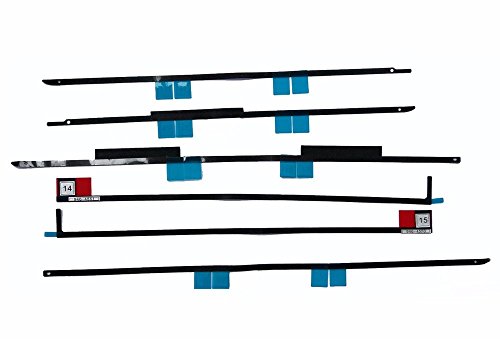

These are the highest quality adhesive stickers available but they require 100% correct installation upon perfectly clean parts that have no trace of dirt/ dust or the previous adhesive tapes for maximum contact heat the ...

Buy Now From Amazon

Product Review

These are the highest quality adhesive stickers available but they require 100% correct installation upon perfectly clean parts that have no trace of dirt/ dust or the previous adhesive tapes for maximum contact heat the adhesive with hair dryer before applying

Please note that these adhesive stickers are designed for A1419 and will NOT work for A1418 as there are thiner stickers designed specifically for that model
Removing the display on the A1419 iMac also requires a specialized iMac opening tool. You can follow this link below for instructions.
https://www.ifixit.com/Guide/iMac+Intel+27-Inch+EMC+2639+Adhesive+Strips+Replacement/24341


Compatible for iMac A1419
- For iMac13,2 Late 2012: MD095LL/A (2.9 GHz Core i5)
- For iMac13,2 Late 2012: MD096LL/A (3.2 GHz Core i5)
- For iMac13,2 Late 2012: MD096LL/A (3.4 GHz Core i7)
- For iMac15,1 Retina 5K Late 2014: MF886LL/A (3.5 GHz Core i5)
- For iMac15,1 Retina 5K Late 2014: MF886LL/A (4.0 GHz Core i7)
- For iMac15,1 Retina 5K Mid 2015: MF885LL/A (3.3 GHz Core i5)
- For iMac17,1 Retina 5K Late 2015: MK462LL/A (3.2 GHz Core i5)
- For iMac17,1 Retina 5K Late 2015: MK482LL/A (3.3 GHz Core i5)
- For iMac17,1 Retina 5K Late 2015: MK482LL/A (4.0 GHz Core i7)

Identifying Numbers:
- Part #: 946-4547, 946-4548, 946-4549, 946-4550, 946-4551, 946-4552, 946-01031, 946-01032, 946-01033, 946-03774, 946-03775
- Related Apple Part #: 076-00009, 076-1419, 076-1444

What's included:

LCD display adhesive strip kit (6 pieces), not including any other tools as pictures.


  • Adhesive strips must be replaced every time the display is removed for repair or upgrade purposes.Removing the A1419 display on iMac requires cutting through the adhesive around the perimeter of the screen. After the adhesive is cut, it cannot be used to re-seal the display in place, so you'll need to apply a new set of adhesive strips.
  • Before you start placing strips, remove all of the old adhesive. Use a spudger to scrape up an edge, then peel with your fingers.Remove all of the remaining adhesive strips from the iMac's frame and display glass.
  • Include: A1419 LCD Adhesive Strips Replacement X 1
  • Please heating the adhesive strip before installtaion, to make sure the adhesive tape tightly stick to the liquid crystal.press the edge of panel and let the panel lay down for a few minutes.
  • Note: Professional Operation Only!We are not responsible for any damage during teardown.

Similar Products

Odyson - Replacement for iMac Opening Wheel Handle + 5 Wheel Cartridges 2012-2017 LCD Screen RemovalWillhom Opening Wheel Handle + 5 Wheel Cartridges for iMac 2012-2017 LCD Screen RemovalOWC In-Line Digital Thermal Sensor HDD Upgrade Cable for 27 inch iMac 2012 and laterWillhom (076-1416, 076-1422, 076-1437) LCD Display Adhesive Tape Kit Replacement for iMac 21.5" A1418 (Late 2012-Retina 4K Late 2015)Fenlink 2.5" to 3.5" Internal SSD Hard Drive SATA Drive ConverterNewerTech AdaptaDrive 2.5" to 3.5" Drive Converter BracketINYES LED LCD Panel Adhesive Tape/Strips Replacement with Opening Tools 076-1437 for Apple IMAC A1419 27" 2012 2013 2014 2015Timetec Hynix IC Apple 16GB Kit (2x8GB) DDR3 1333MHz PC3-10600 SODIMM Memory Upgrade for MacBook Pro 13-inch /15-inch /17-inch Early/Late 2011, iMac 21.5-inch Mid/Late 2011(16GB Kit (2x8GB))Crucial MX500 1TB 3D NAND SATA 2.5 Inch Internal SSD - CT1000MX500SSD1(Z)Sabrent 2.5" SSD & SATA Hard Drive to Desktop 3.5" SATA Bay Converter Mounting Kit (BK-PCBS)