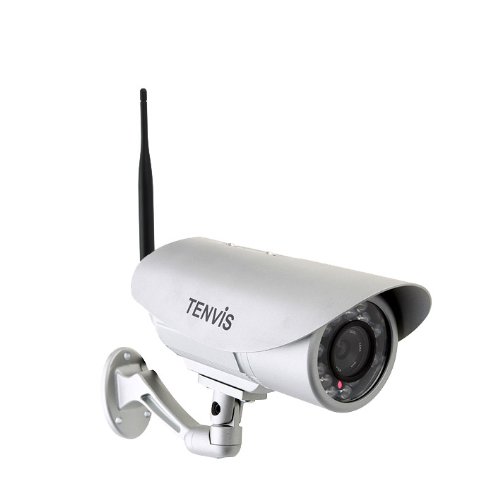

Product Review
Easy 5 Steps Installation:
1. Plug in Power and Network Cable to Camera.
2. On Your Smart Phone, Download and Install the "New Tenvis" App from Apple Store or Google Play.
3. Fire up the App to Create a Account and Sign in.
4. The App Automatically Detects the Cameras in the Same Network for Quick Edit and Live View.
5. Configure the WIFI Setting for the Camera, Then Detach the Network Cable and Place the Camera Anywhere Within WIFI Network.
Specifications:
Model: IP391W-HD Image Sensor: 1/4/" color CMOS
Lens: 6mm
Infrared LEDs: 18PCS Image Resolution:1 megapixel
Night Vision: 15 M (49 feet)
Video Compression: H.264
Max Image Frame Rate: 30fps
Resolution: 1280×720 (720P), 640×352 (VGA), 320×176 (QVGA)
Privacy Mask: Protect privacy areas
Wi-Fi:IEEE 802.11b/g/n
Antenna 5 DB
Motion detection: Send screen captures to email within preset time periods.
User-friendly Feature: Plug and Play function
User Authentication : Authentication: user/password; administrator/Operator
Web Browser: IE 7.0 or above version, Safari, Opera, etc
Mobile View: Support iOS and Android devices
Power: DC 12V, 1A
Power Consumption: 6W/4W (infrared on/off)
Operating Temperature: -10 to +50 °C (+14 to +122 °F)
Operating Humidity:10~80%RH non-condensing
Package Dimensions: 245mm x 115mm x185mm (L x W x H)
Gross Weight: 1150g
Certification: CE; FCC; RoHS
Limited 1-year warranty
Package Included:
1 x Wireless Outdoor IP Camera
1 x Application CD
1 x Adaptor
1 x Bracket
1 x Quick Start Guide
1 x RJ45 Cable
2 x Mounting screws


