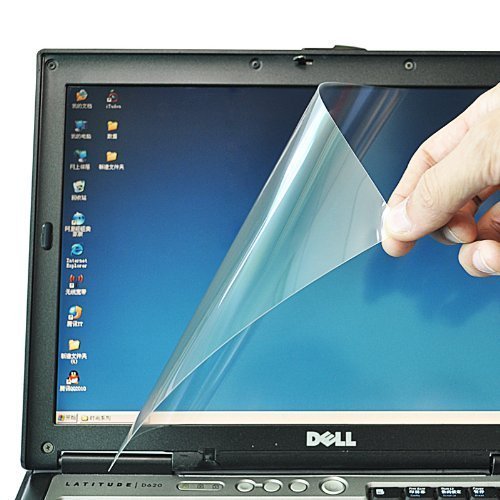

[ Screen Protector Installation Guide ]

1. Clean the screen with the provided microfiber cleaning cloth in a dust-free environment.
2. Preposition of the screen protector before installation. It's easie...

Buy Now From Amazon

Product Review

[ Screen Protector Installation Guide ]

1. Clean the screen with the provided microfiber cleaning cloth in a dust-free environment.
2. Preposition of the screen protector before installation. It's easier to start by aligning from the bottom edge with the label No.1 layer then working your way up to the top of your screen.
3. Carefully start peeling off the label No.1 layer as you slowly adhere the screen protector to the LCD screen from the bottom to the top.
4. Gently sweep through the screen surface with the provided cleaning cloth. Push out any air bubbles towards the nearest edge.
5. Finally, peel off the label No.2 layer.

1. Prevent fine dust, prevent air bubbles. Please be sure to clean the screen well, you can use scotch tape to clean your laptop screen first if you need, and make it thoroughly clean even at the beginning and in the processing while you posting the screen protector, it will effectively prevent the bubbles.
2. We suggest you to ask a professional to post the screen protector for you.


  • Compatible with 15.6-Inch Dell Inspiron 15 3000 5000 series ( 345mm x 194.5mm ). If you have 15.6" TOUCHSCREEN laptop, this protector only cover the screen part, it CAN'T cover the frame part
  • Made from triple layer high quality electrostatic material.
  • Easy to apply with the instructions, please don't do it before any instruction from us.
  • Package Includes: 1 x Screen Film, 1 x Cleaning Cloth. Ships in retail packaging.
  • We Stand behind of our Products and guarantee to the original purchaser for a period of three-months limited warranty from the original purchase date. If your protector is scratched or damaged or you are simply not happy with it in any way, simply send it back and we will send you out a free replacement or refund you money.

Similar Products

AutoLive Translucent Black Ultra Thin Silicone Keyboard Skin Protector Cover for Dell Inspiron 15 3000 & 5000 series, such as 15-3541, 15-3542, 15-3543, 15-3551, 15-3552, 15-5545, 15-5547, 15-5548, 15-5558, 15-5559, 15-7559,17-5748, 17-5749,17-5755, 17-5759 US VersionCaseBuy Keyboard Silicone Cover Protector Skin for Dell Inspiron 15 3000 5000 i3541 15-3542 15-3543 15-3551 15-3552 15-5545 15-5547 15-5548 15-5555 15-5558 15-5559 15-7559 17-5748 17-5749 17-5755 17-5758 17-5759 US Layout(Clear)PcProfessional Black Ultra Thin Silicone Gel Keyboard Cover for Dell Inspiron 15 5000 series 15.6" Laptop with Application Kit (Please Compare Keyboard Layout and Model)CaseBuy Keyboard Silicone Cover Protector Skin for Dell Inspiron 15 3000 5000 i3541 15-3542 15-3543 15-3551 15-3552 15-5545 15-5547 15-5548 15-5555 15-5558 15-5559 15-7559 17-5748 17-5749 17-5755 17-5758 17-5759 US Layout(Black)CaseBuy Soft Silicone Keyboard Cover Protector Skin for Dell Inspiron 15 3000 5000 & Inspiron 17 5000 series, 15-3542 i3542 15-3543 i3543 15-3551 i3551 15-3552 i3552 15-5545 i5545 15-5547 i5547 15-5548 i5548 15-5555 i5555 15-5558 i5558 15-5559 i5559 15-7559 17-5748 17-5749 17-5755 17-5758 17-5759(Semi-Black)