
Product Review
Product Introduction
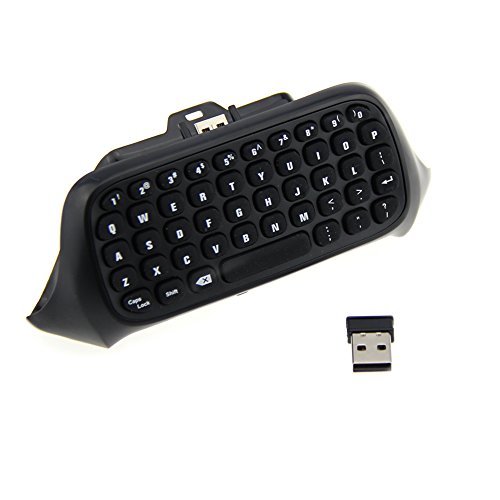
Connect the keyboard to the back of the XBOX one wireless controller, and then insert the 2.4G receiver to any USB interface of the XBOX one console, then you ocan start the text message and email in the games to execute text input function. With optimal keyboard design, you can type quickly only by yhour thumbs, which makes it more convenient and comfortable to use.
Specification
1. Wireless transmission distance: 10M
2. Wireless protocol: 2.4G
3. Working current: 0.8mA (when you press the button)
4. Sleeping current: 3UA
5. Weight: 65g
6. Dimensions: 142*63*45mm
7. Material: ABS
Cautions
1. You need to connect the keybolard to the controller to execute corresponding functions.
2. Connect the connector plug of the keyboard in alignment with the interface of the controller; pull the keyboard to the controller gently, until stick it in the slot firmly.
3. Please do not beat or knock this product forcibly.
4. Keep the product away from all liquids and metal objects.
5. Do not or keep it in high temperature and damp conditions.
6. Please read the handbook to get important safety information before using. Please keep all handbooks well in order for future reference.
![iPhone 6S Plus Screen Protector, BONGEEK Premium Tempered Glass Screen Protector for iPhone 6S Plus / 6 Plus - Clear HD Transparency [Anti-Scratch] [LIFETIME WARRANTY]](https://m.media-amazon.com/images/I/51O21B6UP1L._SL75_.jpg)


![Galaxy S7 Edge Screen Protector, BONGEEK [Full Coverage] HD Clear TPU Film [Ultra High Definition Invisible] for Samsung Galaxy S7 Edge - [1-PACK]](https://m.media-amazon.com/images/I/41jK+lRj3TL._SL75_.jpg)
![iPhone 6S Screen Protector, BONGEEK Premium Tempered Glass Screen Protector for iPhone 6S / 6 - Clear HD Transparency [Anti-Scratch] [LIFETIME WARRANTY]](https://images-na.ssl-images-amazon.com/images/I/51O21B6UP1L._SL75_.jpg)
