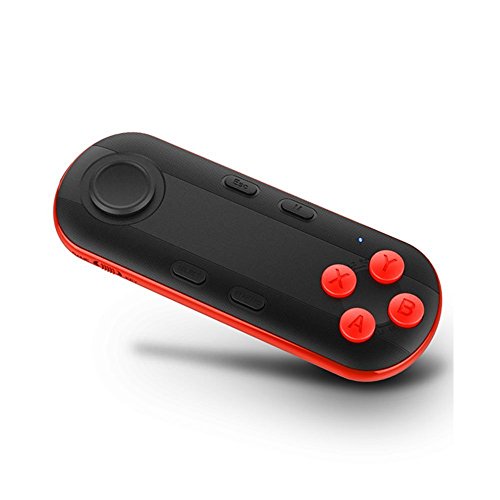

Product Review
Wireless protocol: Bluetooth version 3.0
Support system: Android / iOS / PC
CPU:ARM968E-S Core
Battery: 2*AAA battery ( NO included)
Continuous game time: 40hours
Wireless Distance: 2-10m
Working current: 0.5-8mA
Standby current: 0.5-1mA
Size:116*45*13.5mm
Power ON: Press START button until LED is on(about 2 seconds)
Power OFF: Press START button until LED is off(about 5 seconds).
Pair and connect: after power on , LED indicator will flash, the device will enter into the Bluetooth pair mode automatically to find the address and name of this device, click then can connect. Pair and connect successfully, LED indicator will turn off.
Game function: Turn side switch to Game side(there is "GAME" on back), now device is operated by -hands horizontal.
Selfie Operation: For android Samsung, B to shutter. Volume key to adjust focus.
E-book Flip : for iReader, use Volume +/- to turn pages, in Kindle or PPT for use joystick in Game mode to turn page.
Music Control& TV Box & Mouse & PPT Presentation
What kind of phone for the self-timer?
Android version 4.3 or 4.3 or above can use, Apple iOS 7.0 or 7.0 above system is also the perfect support.
Note:
Apple iOS System: Supports all formats of iCade Game Consoles.
Furthermore, it can be controlled with Selfie Camera Shutter and music control. This item can't be used as wireless mouse in iOS system.
When unexpected result in can't shut down, please use needle tapping the reset button.
Notice:
-Please read the USER Manual carefully before use. For Game function, you have to spend some time configuring.
- Pls feel free to contact us if our product with any quality problem,because we are also manufacturer and consumer wanting better products.Thanks .
Package include:
1 x Bluetooth remote controller
1 x User manual

![VR Headset for iPhone & Samsung [All Android] Virtual Reality Glasses - Play Your Best Mobile Games & 360 Movies With Soft & Comfortable New 3D Goggles Plus Special Adjustable Eye System](https://images-na.ssl-images-amazon.com/images/I/41TmQSTWaSL._SL75_.jpg)

