
Product Review
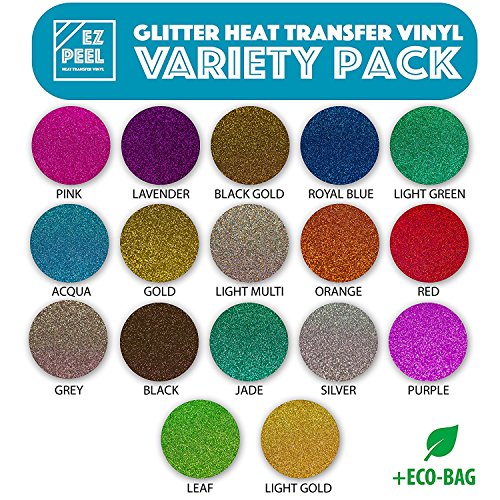
EZ PEEL makes it easy to design your swag headache-free. The secret is in our proprietary KOREAN POWDER TECHNOLOGY. We use a formula that allows your designs to stretch NOT tear. This is important with intricate designs and detail. We provide a reasonable price for a superior product that allows you unparalleled customization. Your t shirt vinyl should be able to stand up to every part of your lifestyle so you don't have to worry! BUT WHAT ABOUT THE TRANSFER? We've got you covered there too! By infusing the glitter into the vinyl, your heat is always evenly distributed throughout your htv sheet. That prevents bubbles and lifting. Cheaper htv glitter options layer the glitter on top of the vinyl, making it hard to transfer and peel. TREAT YOURSELF to a premium htv glitter experience by using a premium product! NOT SURE IF YOU HAVE THE RIGHT TOOLS? We've worked with industry experts to ensure that this product perfectly fits you CRICUT and SILHOUETTE CAMEO. See Instructions below for the best results! Why can't all projects be this easy? Silhouette Cameo Settings Ratchet Blade - Set to 7 Speed 5cm/ sec Thickness 21 Cricut Blade Depth - 4 Pressure - 3 (medium) Speed - Medium Multi Cut - 1 Blade Assembly - Regular FOR BEST VINYL IRON ON RESULTS: We recommend that you set the iron to a heat setting of about 80%. Then, after you have cut and peeled your vinyl, press down on the vinyl with lots of force while making circular motions. Peel the film off slowly and if the transfer was not successful lay the film back down and repeat the steps. FOR BEST HEAT PRESS RESULTS: Set your heat press to 310 degrees Fahrenheit. After you have cut and peeled your vinyl, apply it to your apparel using firm pressure for 10-12 seconds. Peel the film off slowly and if the transfer was not successful lay the film back down and repeat the steps.


