
Product Review
User guide:
1.Connect the power cable correctly
2.Turn the switch to " TURBO" or "SLOW"
3.Start PS4 Slim console, it will begin to work when the temperature is over 40 ℃.
4.This product stops to wrok when turn the switch to "OFF".
Product maintenance and attention:
In order to correctly use and maintain this product, please read this user guide carefully.
1.Input voltage should be DC 5V, stable and standard.
Output current should be ≥600mA.
2.Please check if all the accessories are well before busing it.
3.Make sure this product is powered on and connected well.
4.Please pull out this product from the PS4 Slim console if not using it in long time.
5.Avoid using and storing this product in humid environment.
6.Please stop use this product if the cable is hot.
7.Please stop use this product if it is soaked, hit or broken, and send it to the
professional for repairing.
8.Please do not put this product in high temperature or throw it into fire.
Please do not wipe this product with chemicals, scratch it with sharp things, and press it
heavily and fall it.
Specifications:
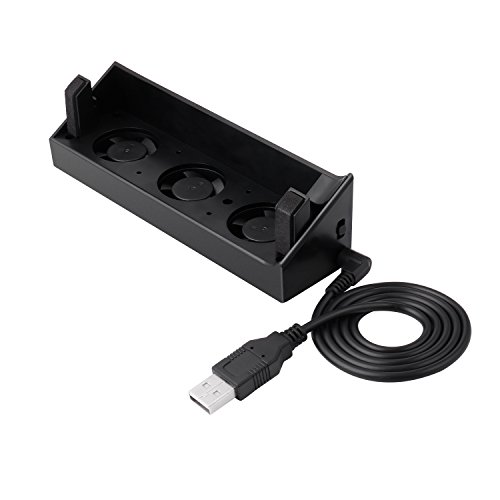
1.Application: for PS4 Slim console
2.Working voltage: DC 5V
3.Fan type: DC 5V 0.15A, 10000±10%RPM
4.Product material: ABS
5.Product size:141 x 37 x 36mm
6.Accessory: 1PC DC power cable
7.Color: black
Package included:
1 x Cooling Fan for PS4 Slim Console
1 x USB Cable
1 x Manual
![TNP 5 Port USB Hub for PS4 Slim Edition - USB 3.0 / 2.0 High Speed Adapter Accessories Expansion Hub Connector Splitter Expander for PS4S PlayStation 4 Slim Edition Gaming Console [PS4 Slim Edition]](https://m.media-amazon.com/images/I/31aX5czuc0L._SL75_.jpg)


