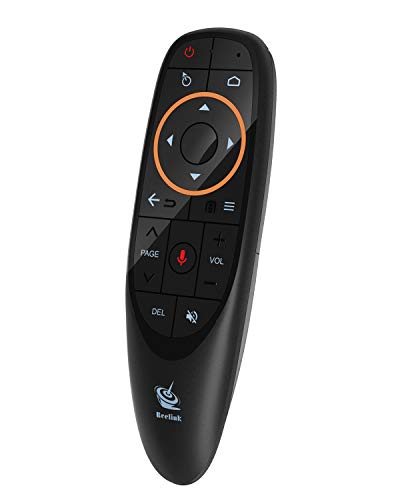

Product Review
Product Specification
Model: A015
Acceleration Sensor: 3 axis g-sensor
Gyro-sensor: 3 axis gyroscope
Communication: 2.4 Ghz
Frequency: 2.400-2.483Ghz
Working Current: 20mA
Indicator: 1 LED indicator
Product Size: 138.92*41.77*27.93mm
Receiver Size: 18.58*14.59*6.7mm
Weight: 65g
USB: USB2.0
Package including:
1 * Wireless game controller
1 * Receiver
Warning: This operation may disconnect the original paired connection, please operate with cautions.
1). Plug in the USB dongle receiver, keep the distance between the remote control and the pc within 1m.
2). Press the Red key (No. 9 Key) and "Back" (No. 6 Key) for 3 seconds, when the indicator begins blinking quickly, leave your hand from the keys.
3). When the indicator stops blinking, pairing succeeds.
Factory Reset
This remote control has the function of automatic sensor alignment. Only operate this step when the mouse cursor behaves abnormally.
1). Remove batteries, press and hold the left key and the right key on the navigation panel, install batteries, the indicator shall blink quickly.
2). Place the remote control on a stable surface and make sure it stays still, then press red key, the indicator shall turn off.
3). Release red key, if the indicator turns on and air mouse works right, the operation succeeds.
Notice: Keep the remote control still. If the remote controller moves, the data may be incorrect, and it needs to be readjusted.


