Product Review
Set up guide for PS4 / Xbox One console.
1: Turn on your console. Plug the Adapter into your PS4 / Xbox One console.
2: Connect your OFFICIAL SONY PS4 / Microsoft Xbox One Wireless Controller to the Adapter via a CHARGE&SYNC cable.(NOTE: CONTROLLER MUST BE POWERED OFF)
3: Plug your favorite Keyboard and Mouse into the Adapter. Wait for about 10 seconds the Keyboard Mouse will be activated successfully.
4: Press "F3" to decrease or "F4" to increase mouse speed.
NOTE:
It says "mouse connected" when you plug the Adapter to PS4 console.It says "mouse disconnected" when the Keyboard Mouse activated successfully.
The controller and headset on controller DO NOT WORK when the Keyboard Mouse is in use.
You must connect our Keyboard Mouse Adapter to your console USB port. Cant use other extension HUB.
If the Keyboard Mouse do not work after plug in. Unplug and plug it to the console again.
You must use a charge&Sync cable when you connect the controller to the Adapter.(Charging cable NOT work)
Set up guide for PS3 / Nintendo Switch console.
1: Turn on your console. Plug the Adapter into your PS3 / Nintendo Switch console.(Switch console should be in TV mode and Adapter should be pluged into the Switch Dock.)
2: Plug your favorite Keyboard and Mouse into the Adapter.
3: Press Ctrl 1 to activate Keyboard Mouse on PS3. Press Ctrl 2 to activate Keyboard Mouse on Nintendo Switch.
4: Press "F3" to decrease or "F4" to increase mouse speed.
NOTE:
You must turn on the "PRO Controller Wired Communication" when you use our Adapter on Nintendo Switch console.
Go to "Settings" - "Controllers and Sensors" and click "On" of "PRO Controller Wired Communication".
Package include:
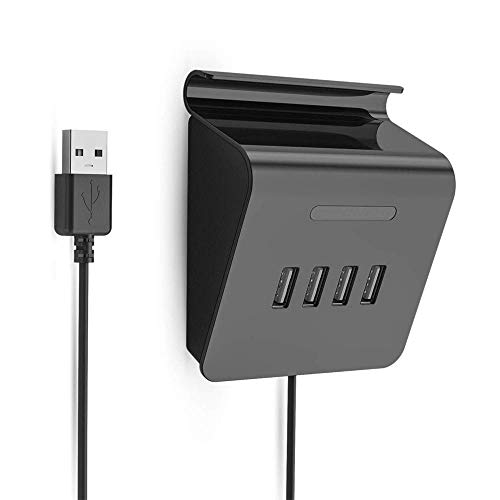
1 x 4-Port USB 3.0 Data HUB Adapter
- SUPPORT -- Computer USB3.0 and mobile phone or tablet Micro USB interface with OTG function , external 4USB interface OTG connector.Computer USB interface and MicroUSB mobile phone Android system does not need to use the driver, can directly connect to the external storage device on the USB port to quickly browse and edit files.Easy to carry, download and upload. HUB transmission speeds up to 480Mbps.
- POWERFUL -- Great for FPS (First Person Shooter), RPG (Role Playing Games) and RTS (Real Time Strategy) games.Such as H1Z1, Rainbow Six Siege, Overwatch, Fortnite, PUBG, Battlefied, Call of Duty, Counter-Strike,Titanfall, Far cry etc..At the same time, this HUB adapter can be used as a phone stand.
- COMPATIBLE -- Compliant with USB 3.0 specification, and backward compatible with USB 2/1.1/1.0 standard specifications, using the third generation USB HUB controller, no driver, plug in and use, all made of high-quality electronic devices to ensure product operate stably. Support hot plug function. It can connect a variety of high-speed (480/12Mbps) and low-speed (1.5Mbps) USB peripheral products. Support win98/ME/2000/XP/7/8/MAC OS/Android and other systems.
- FUNCTION -- Interface: USB3.0, voltage 5 volts, 4 USB ports, each power supply up to 500 mA, no need for external power supply when connecting devices below 500 mA, when using large capacity mobile hard disk and the power supply is insufficient, find a power port plugged into the power supply to the HUB power supply, then it can be used normally, there are LED lights can show whether it is working
- KNOW BEFORE ADDING TO CART -- Our Adapter is already compatible with most popular keyboard and mouse brands in the market. But still some not works from the thousands of keyboard mouse models in the market. Please recognized that there's no perfect Adapter before purchase this one. If you receive the Adapter not working properly with your keyboard or mouse. Please feel free to contact us!