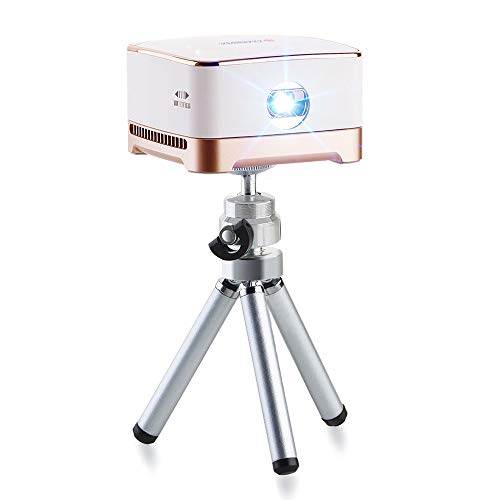

Product Review
NOTE:
1,Copyrighted content from Hulu, Netflix, and similar services cannot be mirrored or screened. Use the app directly from the projector to view copyrighted content from these providers.
2,110" is the largest picture size and can only be displayed clearly in very low light conditions.
DISPLAY:
Native Resolution: 854 * 480
Brightness: 100 ANSI lumens
Lamp life: 30,000 hours
Display ratio: 16:9
Throw size:1m/37.8in,2m/75in,3m/110in
Wi-Fi: Dual band WiFi
INTERFACE:
Projection distance: 0.2-3 m
Micro SD slot: Support Max 64GB
Micro-USB: Charging and data storage/connection via USB OTG
CONTROL:
Physical button: power / volume / mode switch
Device support: Android and IOS
Support wirless protocol: Airplay/Miracast/DLNA
HARDWARE:
Memory: 1GB DDR3
Battery: 4200mAh (Polymer battery)
Operating system: Android 7.1
Feature support: WiFi and Bluetooth
Working mode: projector mode, Bluetooth speaker mode
Movie playback time: 4 hours in battery mode
Charging time: 2.5 hours, fast charging 2.0 9V2A
WHAT'S IN THE BOX:
1 * Projector 1 * Adapter 1 * USB cable 1 * OTG cable 1 * Remote Control 1 * Tripod 1 * Manual
You must be aware of how to Netflix connecting remotes:
Connecting the remote control problem: First, make sure the remote control is properly connected after turning on the projector and it can be used normally.
Second, when using the Netflix app, go to the system interface and look for Bluetooth. Make sure the Bluetooth function is turned on normally. Then use the remote control in the Netflix app and press the button in the middle of the back button. A "small mouse" will appear next to it. This will allow you to use the remote control normally.
Due to the different Netflix applications, the "left and right" buttons on the remote will not work properly.


