
Product Review
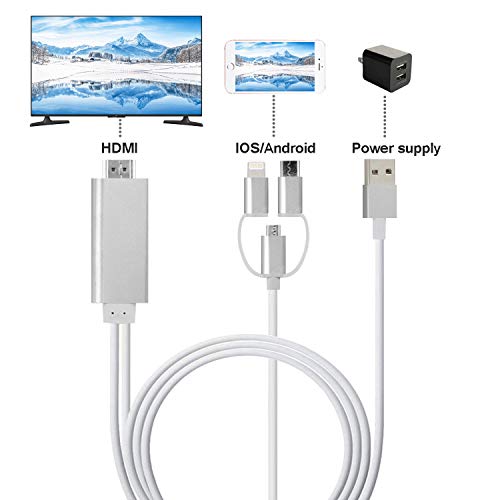
Easy connection, plug and play!
Support IOS 11.0 above and Android 6.0 above devices, please check parameter on your devices before purchase.
How to use:
1. Connect HDMI end to TV/Projector/Monitor's HDMI port, and connect 3 in 1 end your phone
2. Connect an external 5V/1A(ipad need 5V/2A) adapter with USB end to power up this cable, note that power bank is not enough to make it works
3. For IOS devices: connect the phone and click "Trust" on your phone and then can be used directly;
For Android devices: please turn on USB debugging firstly
4. Click the "SOURCE" key on your remote control, then choose "HDMI" signal source
5. Waiting for 15s, phone can be mirrored to TV/projector/monitor
Specifications:
Brand: ZFKJERS
Product name: 3 in 1 Phone to HDMI Cable
Color: Gold/ Silver/ Rose gold
Cable Length : 2 m/ 6.5 feet
Video Resolution: 1080P
Compatible Devices:
1. iPhone 6/6 Plus/6S/6S Plus/7/7 Plus/8/8 Plus/iPhone X/Xs
2. iPad mini1/2/3/4/iPad 4/iPad Air/Air 2/iPad Pro
3. Android 6.0 above brands smartphone with micro USB/USB C port
Package list:
1* 3 in 1 HDMI cable
1* English Manual
Attention:
1.Not all Android 6.0 devices support USB mirror
2.Few mobile phone are not compatible with the audio out-put, and consequently the sound may come from the smartphone instead of TV/Projector
![QGeeM USB C to HDMI Adapter 4K Cable, USB Type-C to HDMI Adapter [Thunderbolt 3 Compatible] MacBook Pro 2018/2017, Samsung Galaxy S9/S8, Surface Book 2, Dell XPS 13/15, Pixelbook More](https://m.media-amazon.com/images/I/31NRHVwmqLL._SL75_.jpg)


