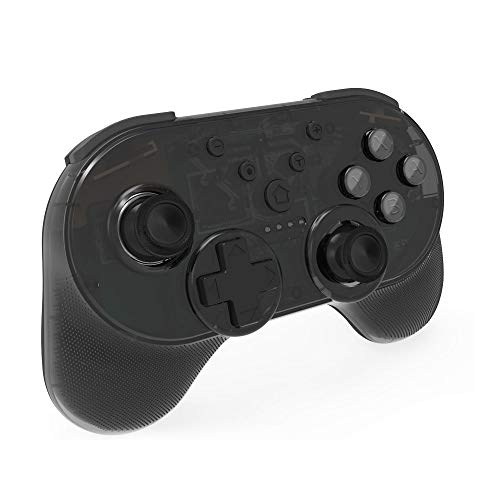

Connection Instruction:

The first time you connect it, please follow these three steps to do so.

1.Enter to Switch's controller pair settings.

2.Click "Controller"Click "Change Grip/ Ord...

Buy Now From Amazon

Product Review

Connection Instruction:

The first time you connect it, please follow these three steps to do so.

1.Enter to Switch's controller pair settings.

2.Click "Controller"Click "Change Grip/ Order"

3.Long press "Y and HOME" Button for 5 seconds, 4 channel lights flash in turn. If the connection is successful, the corresponding channel light keeps on.

4.Please make sure your host is on before connection and has been upgraded to the latest version.

How to wake up your controller:

When controller is in the status of powering off,you should wake up your controller with short press Home button,LED channel light 1-4 will blink.

Guaranteed quality:

JOYTORN provide 6-Month Worry-Free Warranty and Unconditional 45-Day Refund & Free Lifetime Technical Support.

Similar Products

HORI D-Pad Controller (L) (Mario) Officially Licensed - Nintendo SwitchGOD EATER 3 - Nintendo SwitchJ&TOP Mini Wireless Controller Compatible with Nintendo Switch,Support NFC Function,Bluetooth Pro Controller Gaming Gamepad for Nintendo Switchemoi Multicolor Baby Night Light, Bedside lamp Portable Silicone Cute Mushroom Nursery Night Lamp, Dim Mood Lamp, Tap Color Control, 100% BPA-Free, Rechargeable for up to 6-Hour Usage.(H0022W)Funlab Premium Game Card Case for Nintendo Switch, Portable Aluminum Games Storage with 6 Cards Holder for Travel Carrying - RedNintendo Amiibo - Ivysaur - Super Smash Bros. Series - SwitchNintendo Switch Original Joy-Con Strap - 2 Pack Black (Bulk Packaging)HORI Compact PlayStand - Mario Edition, Officially Licensed by Nintendo - Nintendo SwitchHestia Goods Carrying Case for Nintendo Switch Case - Fit Original Charger AC Adapter - with 20 Game Cartridges Hard Shell Travel Switch Pouch for Nintendo Switch Console & Accessories, Black